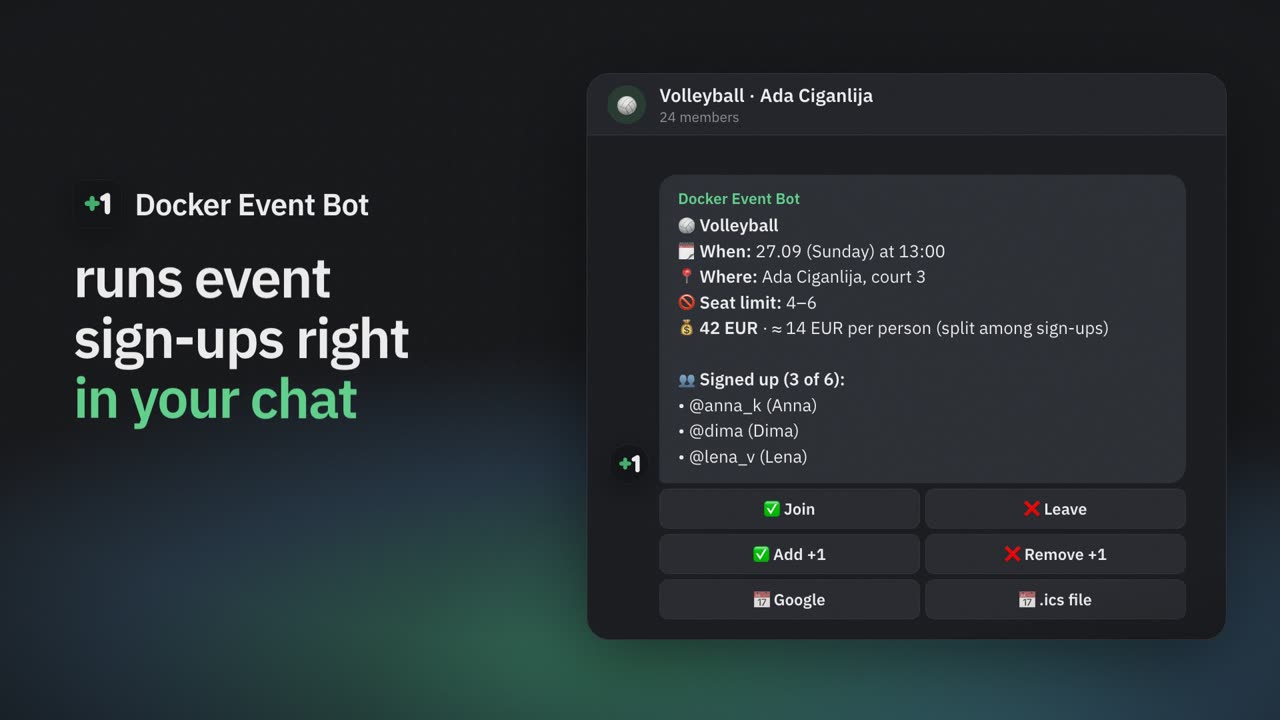
No need to even open the bot
Members sign up and leave with a button on the card, right in the chat. No app, no account, no forms — the app is there for those who want more.
Telegram bot for group events
No spreadsheets, polls or “+1 in the comments”. The bot posts an event card, people tap Join — seats, the waitlist and reminders take care of themselves.
Free · nothing to install · works in any Telegram group
Watch the video · 1:25
Event apps lose for one reason: all twelve people have to download one, install it and figure it out. Simple sign-up bots ask for none of that, but they can’t do much and are clumsy to use. Docker Event Bot lives in the chat where you already argue about who’s coming, and it has everything you need for hassle-free sign-ups.
Members sign up and leave with a button on the card, right in the chat. No app, no account, no forms — the app is there for those who want more.
The card is a regular message in your chat and updates itself as people join and leave.
No subscription and no payments through the bot. Add it and use it.
Most sign-up bots live inside a single chat. Docker Event Bot connects them: football, board games and a language club in different groups all come together in one app inside Telegram.
The app lists all your chats where the bot is. Open any of them to see upcoming events and who’s going.
Events you joined in different chats show up in one list and one calendar. No scrolling through five chats to remember when and where.
Create, edit, cancel and reschedule events in all your chats from one place. “Create similar” copies an event to another chat in a couple of taps.
The Mini App opens right inside Telegram — no install, no sign-up. This is what members and organizers see.

Every group with the bot, with its next event and member count.

Your events from different chats, laid out by date.

Seats, per-person cost and who’s going — updates as people sign up.

Who came, who didn’t, and attendance streaks — for every event.

Levels, streaks and medals like “Reliable” — the grey ones are still to earn.
and make it an admin — it needs this to post and pin event cards.
in the app — or send /start in the chat and the bot offers the form. One-off or weekly: place, time and, if you like, a seat limit. Takes a minute.
The list, free seats and the waitlist update right in the card.
Out of seats — people join the waitlist. Someone leaves — the next person gets the seat and a personal message. Nobody has to sort it out by hand.
Up to three reminders — say, a day and an hour before — in private messages, with a nudge to free the seat if plans changed. The organizer can also remind everyone with one button. And a day before, the organizer is told if the event is short of its minimum.
“Every Wednesday at 20:00”: the bot posts the new card on schedule by itself. One-off events work too.
“Add +1” — a friend without Telegram takes a seat too and is counted in the limit.
Add the event to Google Calendar or Apple Calendar (.ics) with one button on the card. A map or venue link turns the place name into a link — in the card, reminders and calendar.
After the event: “Were you there?” poll and admin marks, and organizers see who dropped out at the last minute. Medals for showing up and streaks for every event.
Enter the court rent — the card shows the per-person share and recalculates as people sign up. Money doesn’t go through the bot.
More people, longer game: “from 6 people — an hour, from 10 — an hour and a half”. The card shows the duration for the current sign-ups and updates it as people join.
Plans changed? Everyone who signed up gets a personal message showing what was and what is now, and the card in the chat updates by itself.
Turn on team sign-up: people create a team or join one, and the card shows a table of rosters with the captain marked. The fee is split per team.
Before the game, the admin splits everyone who signed up into teams — at random or evenly by level — and posts the line-ups in the chat as a reply to the card. Each player is mentioned and sees their team in the app.
⚖️ Need to split the players who signed up into teams? Try the free team generator — random or even by skill.
| “+1” or a poll in the chat | Other sign-up bots | Docker Event Bot | |
|---|---|---|---|
| Seats and the limit are counted for you | No | Yes | Yes |
| Waitlist that moves up by itself | No | Not all | Yes |
| Reminders before the event | No | Not all | Yes |
| Recurring events posted on schedule | No | Not all | Yes |
| All your chats and sign-ups in one app | No | Not all | Yes |
| Attendance stats and reliability | No | Not all | Yes |
| Per-person cost split | No | Not all | Yes |
| Teams sign up for tournaments | No | Not all | Yes |
| Members don’t need to open anything but the chat | Yes | Not all | Yes |
“Other bots” means typical Telegram sign-up bots — their features vary from bot to bot. Docker Event Bot does all of this, for free.
📖 A detailed comparison of all the ways — in our guide to sign-ups in Telegram groups.
Both live in Telegram and on the same site — pick the one that fits.
Sign-ups for games and meetups in group chats: a card with a button right in the chat, waitlist, reminders.
You are here
Booking with a specialist: services, free slots, confirmation and reminders in private messages. Free.
Open the site →The rating is live: it comes straight from the app, where anyone can rate the bot.
Very handy and easy-to-use app. Wishing it further growth — I will definitely be keeping an eye on it.Очень удобное и простое в использовании приложение, желаю дальнейшего развития, я определенно буду за ним следитьTranslated from Russian ·
Excellent and very easy to use — really comes in handy when you need to organize a basketball game or a board game night.Odličan i jako lak za upotrebu, odlično dodje kad treba da se organizuje basket ili veče za društvene igreTranslated from Serbian ·
Great bot! Thanks :) Everything is really convenient.Крутой бот! Спасибо) Все очень удобноTranslated from Russian ·
Nice bot, used it to gather friends in one place at one time, which is tricky sometimes.Been using this bot to organize events in our Telegram group. Does exactly what you need without making things complicated. Pretty useful stuff!Good bot — I added it to the chat and it became easy to keep track of events with friends: the bot sends notifications to the chat on its own, so you don't even have to add the event to your calendar.Хороший бот, добавил в чат и стало удобно трекать мероприятия с друзьями - бот сам присылает уведомления в чат, можно даже не добавлять мероприятие в календарьTranslated from Russian ·
Yes. There is no subscription and no payments through the bot. The optional cost split only calculates each person’s share — money is settled between you, as before.
Yes. Enter the total cost and currency in the event settings — the card shows each person’s share and recalculates it as people sign up or leave. In team events the fee is split per team. The bot only does the math: money doesn’t go through it, you settle up between yourselves.
No. Everyone signs up with a button on the card in the group chat. The Mini App opens inside Telegram when you need more: your events, calendar, attendance.
To post and pin event cards in the chat. Without them the bot can’t publish the card. It doesn’t use the rights for anything else.
Only chat admins. Every action is checked on the server, so a regular member can’t change settings even with a hidden button.
Add @DockerEventBot to the group and make it an admin, then create an event in the app — or send /start in the chat. The bot posts a card with a Join button, and the list of participants, free seats and the waitlist update in the card by themselves.
A Telegram poll can’t limit the number of seats, keep a waitlist or remind anyone, and “+1” messages get lost in the chat. The bot’s card counts seats and moves the waitlist up when someone leaves — in the same chat, and the bot reminds everyone privately before the start.
Yes. Turn on team sign-up in the event settings and set the team size (and, if needed, the number of teams). People create a team or join one right from the card, and the captain can remove players. There is no waitlist in this mode.
Yes. In the app, the event admin taps “Split into teams”, picks the number of teams and the mode — random or evenly by level (the stars are seen only by the admin and aren’t saved) — adjusts by hand if needed and posts the line-ups to the chat. If the line-up changes, the bot edits the same message instead of posting a new one.
Yes. For example, football on Wednesdays and volleyball on Sundays — each with its own card, schedule and limits.
Telegram only lets a bot message people who have opened it at least once. Open @DockerEventBot and tap Start — after that reminders and seat notifications will reach you.
English, Russian, Serbian and French. The app follows your Telegram language, and each event card can use its own language.
Email dockereventbot@gmail.com — questions, ideas and bug reports are all welcome. You can also rate the bot and leave a review right in the app, on the Profile tab.
Only what sign-ups need: your Telegram ID, name or @handle, language and sign-up history. Send /privacy to the bot to delete all your data yourself, right away.
Add the bot to your group — the first event card is a minute away.
Questions, ideas or feedback? Email us: dockereventbot@gmail.com